
I have been spending this snowy day on my couch doing organizational work. I have been doing this my whole life. I carry papers with me all the time. The 8-1/2 by 11-inch sheets of paper contain “To Do” lists for general details, clients, DigiDame, medical, hobbies, birthdays, gifts, travel, dates of upcoming events, and other notes I can’t think of right now.
Sometimes these piles of papers are so big that I have to carry a separate suitcase for them when I travel back and forth to Miami. I need these papers with me all the time because they are reference materials to all the projects I am working on. If these pieces of paper are up-to-date, then I have more control my work. Most of the time we are handling 15 different projects at once in addition to our daily responsibilities.
When you’re in the service business you make sure there are plenty of productive projects going on so that you are invaluable to your clients. Some consultants drag these projects on month after month because they feel the minute they are done, they will get fired because there is nothing left for them to do. We feel the opposite: the more we do, the more opportunities pop up.
I rarely miss a deadline. All my papers dictate my next move. Lately, it has been very difficult to maneuver them all. It takes too long to find notes, even when they may be staring me right in my face. My friend Maurice de Hond from Amsterdam tried to organize me 25 years ago by forcing me to give up pad and paper. I did for a while, but got immediately frustrated with inflexible software programs.
i want to organize my work in such a way that I can retrieve information by date, topic, keyword, and numbers. Jason Henriques in my office suggested I try Evernote, an operating system platform for OSX, iOS, Chrome OS, Android, Microsoft Windows, Windows Phone, BlackBerry, and WebOS. It also offers online synchronization and backup services.
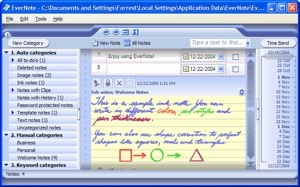
Evernote is a suite of software and services designed for notetaking and archiving. A “note” can be a piece of formatted text, a webpage (full or excerpt), a photograph, a voice memo, or a handwritten “ink” note. Notes can also have file attachments. Notes can be sorted into folders, then tagged, annotated, edited, given comments, searched, and exported as part of a notebook.
One of the reasons why I never used Evernote before was because it looked too complicated. However, now that I’ve gotten started, I’ve found it is really easy to use. I decided to go slow and just get most of the info on my 100 sheets into Evernote folders. If I feel some sheets are too tedious to copy I just snap a picture of it and file along with the lists. Everything is neatly organized and I feel in control.
I just downloaded Evernote for Dummies because I want to learn more tricks and shortcuts that will help me retrieve new and exciting information as well as get deeper into the world of online networking.
Forget about Mars, there are brave new worlds to explore down here.


 DigiDame