Horizontal is the Best Position

20140117-014127.jpg

20140117-014116.jpg

For some reason, friends of mine insist on shooting smartphone videos in the vertical position. I keep telling them that they are cutting off some of the subject matter by narrowing the view. They don’t care. I think they want to be obstinate.

Funny how things work out. I just found out that there is a new app that solves the vertical versus horizontal positioning problem. I can’t wait to tell some pals about it. Called Horizon, the app holds your smartphone in a landscape mode. Evil Window Dog, the development studio who built the app, explains that if you shoot video in a vertical position, it sometimes comes out with a funky letterbox effect.

The big news about the Horizon app is that it always shoots wide shots, whether you hold your device in portrait, landscape, or even askew. Now that is a big deal.

Horizon is the first app to do this on video and in real­ time, said Evil Window Dog in a press release.

“As the user records, Horizon auto­levels videos utilizing the device’s gyroscope. The orientation of the resulting video stays corrected so that it is always parallel to the ground.”

Horizon uses a neat trick to always record in a horizontal mode.

“The app has a rectangular indicator that always stays in the center of screen. It’s within this viewport that the Horizon app is capturing. No matter how you rotate the device, this box stays centered on the screen. When you start shooting in portrait mode, for example, all you will capture is the horizontal content within the viewport.”

.

20140117-014138.jpg

20140117-014149.jpg

20140117-014158.jpg

Skin in the Game

Technology is used in some bizarre ways. When straphangers around the world found out that seven men removed their pants on the New York City subway in 2002, a rapid-fire email campaign started an annual tradition.

Why? I have no idea other than the world is loaded with exhibitionists. Now 60 cities with 4000 folks participate in this Improv Everywhere event. Here are some photos from the most recent event last week.

20140114-224117.jpg
Buenos Aires

20140114-224424.jpg
Hong Kong

20140114-224616.jpg
New York City

20140114-224928.jpg
Berlin

20140114-225307.jpg
Bangalore

20140114-225520.jpg
Kiev

Embarrassing Typos

20140114-013752.jpg

The first thing I do every morning minutes after I wake up is check to see if Susan Leigh Babcock has proofed my blog post. She normally wakes up around 5am so my copy gets corrected long before you read it. She always sends me the edited and unedited versions so I can see the errors of my ways.

I get real upset when I check my copy and see that the iPhone auto-correct changed some of my words. I always check my copy but somehow I don’t seem to catch those words. I am convinced that the words were right when I typed them but somehow auto correct snuck in and changed them again after I published.

My friend Steve frequently tells me that PR people in a hurry will often send him an email saying “photo shit” instead of “photo shot.” When I see Steve in person he will lean over and whisper “I got three shits today” or “Four shits.” For a long tine, I thought he was talking about his bathroom habits.

Mashable, the tech site, just published a list of words often misspelled.

1-Misspelled: seperate
Correct: separate
Tip: There’s a rat in sep-a-rate.

2-Misspelled: definate
Correct: definite
Tip: Take a close look at the final syllable: nite.

3-Misspelled: calender
Correct: calendar
Tip: You probably pronounce the last syllable as [er], so you have to think [ar] as you write it: cal-en-dar.

4-Misspelled: mispell
Correct: misspell
Tip: You know how to spell spell; add the prefix mis- to it: mis-spell.

5-Misspelled: privlege
Correct: privilege
Tip: You might be pronouncing this three-syllable word with only two syllables. Notice the second i: priv-i-lege. Another common misspelling is privilige. Note the e in the final syllable: priv-i-lege.

6-Misspelled: arguement
Correct: argument
Tip: The verb argue ends in e, but you must drop the e for ar-gu-ment.

7-Misspelled: concensus
Correct: consensus
Tip: The sensus in consensus has nothing to do with the word census. Our word census comes from Latin censare, “to rate, assess.” Consensus comes from Latin consensus, “agreement, accord, sympathy, common feeling.” Think SSS: Con-Sen-SuS.

8-Misspelled: pronounciation
Correct: pronunciation
Tip: There’s no “ounce” in pronunciation, but there is a “nun.” The verb is pronounce; the noun is pro-nun-ci-a-tion.

9-Misspelled: accomodate
Correct: accommodate
Tip: Two sets of double letters, cc and mm: accommodate

10-Misspelled: dependant
Correct: dependent
Tip: People who misspell this one may be thinking ofdefendant, which does end in -ant (although the -ant in defendant is also pronounced [ent].) Note the final syllable in dependent: de-pen-dENT.

20140114-013803.jpg

20140114-013812.jpg

Sharing Your Book Reading Habits

20140112-010028.jpg

20140112-010038.jpg

Book authors rejoice. There are several new digital publishing startups that will be feeding you the information you desperately need to write best sellers: the habits of readers.

For the first time ever, authors will be able to find out:

1) How long did it take most people to read your book?

2) What percentage of people actually read an entire book?

3) Did people read some chapters quicker than others?

4) How many folks skipped to the back of the book to find out whodunit?

Two of the most active new digital publishers are Scribd and Oyster. Spokesmen from both companies claim that all of their subscribers know that their data is going to be shared. Not their names, just the data.

Scribd and Oyster charge readers about $10 a month for a library of approximately 100,000 books. Fans can read as many books as they want.

Now that authors have more ammunition, they are more able to easily interact with their fans on Facebook, Pinterest, Twitter, etc. The digital experience is taking market research to a whole new level.

Scribd just revealed some interesting analysis:

“The longer a mystery novel is, the more likely readers are to jump to the end to see who done it. People are more likely to finish biographies than business titles, but a chapter of a yoga book is all they need. They speed through romances faster than religious titles, and erotica fastest of all.”

Oyster claims its top book, “What Women Want,” is read cover to cover. “Everyone who starts it finishes it. On the other hand, Arthur M. Schlesinger Jr.’s “The Cycles of American History” blows no minds: fewer than 1 percent of the readers who start it get to the end.”

Driving Me Crazy

20140109-220700.jpg

Taking a ride in a driverless car has been all the rage at International CES. Instead of “how are you?” when you meet up with someone, you get “Did you take a drive in one of the driverless cars?” I didn’t, but many have. Everyone has been “driving me crazy” about it.

The only reason I didn’t experience it was because I’d been stuck inside a suite for most of CES. In retrospect, I should have given it a whirl. I am the perfect target audience. I rarely drive anymore.

I am finding out that many people my age are not driving as much. Bosch, the German technology company, is counting on automatic driving, including the parking part.

Bosch has developed a new app that will park cars in the future. It won’t be too long from now that this option will be available. All you have to do is open the app and swipe a designated image on your smartphone.

It’s very strange to watch. Bosch sensors have to be installed on a car and then they scan the available parking spots. After that, the vehicle automatically slides right in. No chance for error.

Click here to see the Bosch scanners do their thing.

The Largest Trade Show on Earth

20140108-233059.jpg
I finally found another person who has attended every CES: 82-year-old Bernie Appel, former President of Radio Shack.

First of all, if you didn’t read yesterday’s DigiDame, please go back one post to learn all about iris scanning. I missed the deadline last night to publish my daily email alert because I was on the telephone yakking to my daughter Whitney. The post talks about how iris scanning is the next big innovation after fingerprint identification. It is fascinating, so don’t miss it.

This is the end of the second day of International CES. I walked my feet off. The show is now 2 million square feet of exhibit space and 2,700 exhibitors. Approximately 155,000 people descended on Vegas for the show. Compare that to the 17,500 folks that attended the first CES in New York City in June of 1967. At that time, there were only 200 exhibitors. CES, you’ve come a long way baby.

Take a tour of the hottest tech at CES 2014 here.

I Only Have Eyes for You

I am getting phone calls, text messages, and emails from friends asking me what’s the next hottest trend emerging from International CES. I am not exactly a soothsayer, but if you want to jump ahead of the recent buzz words like 4K TV, wearable technology, and drones, you can’t ignore iris scanning. Yes, your eye balls. Fingerprint scanning is still in its infancy, but using an iris scanner is coming of age.

Pete Pachal of Mashable was spreading the word about a company called EyeLock on the first day of the show. EyeLock is a security company focusing on iris technology. They created something called the myris, a device the size of your computer mouse that scans your eye. According to Pete’s Mashable write-up, the entire process is pretty simple. “You plug the myris into the USB port on your computer. Pick it up, flip it over, look at it, and the sensor will immediately scan your eye to verify your identity.” That is pretty awesome.

EyeLock claims your iris is the ultimate master password. Fingerprinting is not as reliable. DNA is the “last word” in authentication. But Iris scanning is next in line.

The myris is compatible with Windows PCs, Macs, and even Chromebooks. It supports up to five different users.

Watch the video above for a great demo.

The CycleNav Lets You Know Where You Are Going

20140106-234522.jpg

20140106-234458.jpg

20140106-234510.jpg

A lot of my friends are riding bikes. Some of them hadn’t been on a bike for 40 years, but they were willing to start all over again. They love it. Not only are they getting good exercise but many of them said it’s the best way to explore new neighborhoods when they are on vacation or visiting the country. If the land is relatively flat, they can go on for miles and miles.

The one big obstacle on these bike trips is getting lost. Somehow, when you are younger, getting lost is very exciting. When you hit your 60’s and you are lost on a bike, it is less than a funny matter. We require sudden trips to the rest room and frequent rest stops. Even if we end up not using them, we like to know where they are.

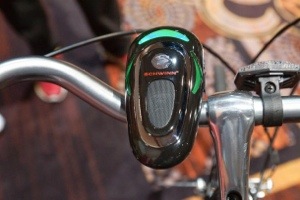
That why when I saw the CycleNav, I knew I wanted to write about it. Priced at $59.99, the CycleNav from Schwinn clips on to any handle bar and tells you what direction to turn to by flashing its lights.

It’s really very simple. You are required to set it up before you start your ride. You simply open up the Android or iPhone app, type in where you want to go, and check the route out to make sure you know the roads well. The CycleNav receives all information via Bluetooth.

A big green light flashes to indicate which way you want to go: left, right, straight ahead. This is backed up by a speaker that provides — and repeats — directions.

Another great feature is that the CycleNav keeps track of trips and feeds the information back to the smartphone. You can also share the information about your ride on Facebook and Twitter making the CycleNav a true social media experience.

The Age of Renewal

20140105-223254.jpg

20140105-223313.jpg

New friends with common interests

I just finished day two of a three day blogger conference. I am more convinced than ever that most of you who read DigiDame should be writing your own blog.

There are just too many of my readers who have knowledge, interests, or hobbies that are not being taken to their fullest potential, especially since we are living in the digital age. If you did use the Internet to further expand your horizons , you would be:

  1. Getting involved in more discussions that you truly enjoy.
  2. Meeting new people who can add new and exciting dimensions to your life.
  3. Learning things that make your interests more fruitful and rewarding.

Our twilight years are supposed to be spent doing things that we didn’t have time to do before, even if we’re still working. Don’t have any regrets about not taking that step out of your comfort zone. The clock is ticking. It’s now or never.

Because of work, I am constantly being forced to do things that are a little unnerving at first. Then once I get into the full swing, I actually start enjoying myself. I had an exhilarating day today. I met several people who are going to help me get involved in projects I never thought I would be able to touch: a different level of charity work, art, politics, and travel.

This all happened because I blog. I learned how to take my expertise and turn it into value added for others. In return, I will receive information and guidance from the leaders in the categories I am interested in.

All you have to do is write a few lines about whatever you are interested in. Post an accompanying photo as well. Try to do this several times a week. Then in order for you to make connections with others, you have to post authoritative comments on their blog sites hoping to spur a conversation. Once that starts, keep the dialog going with your thoughts. Before you know it, respectable and reliable people will be contacting you to join online discussion groups, meet up for events, and participate in special activities.

You don’t know it now, but it won’t take long for you to feel 20 years younger. Humor me. Try it.