Synchronizing the Moments of Your Life

20131002-224324.jpg

20131002-224300.jpg

One of best things about having a smartphone is the camera. I take pictures all the time. Sometimes I post them on Facebook, Twitter, Instagram, LinkedIn, and Pinterest. Other times, I use them for DigiDame or send them via email to pals. A good portion of my photos go nowhere.

I get very upset when I go through my camera roll and see fantastic photos that I never shared with others. There are moments of my life that I know others could relate to and would make for interesting conversations.

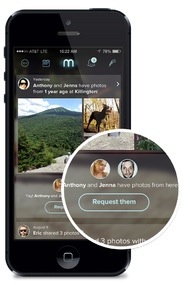
That is why I am particularly interested in a new app called Memoir. The tech site Mashable says:

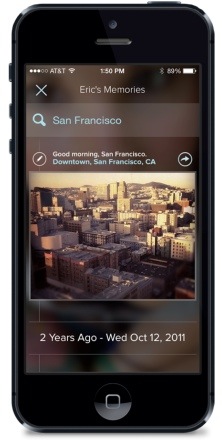
“Memoir syncs and stores photos from your phone and computer in the cloud, organizes them by date and then pulls in data from social networks like Facebook, Instagram and Foursquare to provide more social context. The app uses the time stamp and geolocation data to determine if a Foursquare check-in should be grouped together with an Instagram photo or a picture from your phone’s camera roll. Likewise, it analyzes data about those you’re connected to on social networks to determine if they were part of a particular moment, even if you never tagged them, and makes it easy to search for moments you shared.”

Basically, the brain of this app is collecting all related photos and storing them in one place. It’s done by time stamp and geo-location data. It searches years of files.

Sign up for Memoir. It is being rolled out slowly on iPhone only.
20131002-224348.jpg

20131002-224401.jpg

Videograms for Trigger Happy People

This is so perfect for everyone who loves to share photos on any platform. Instead of sending stills as if they were a piece of art open to interpretation, put your subject matter in a video slide show with music and text.

I get no less than 10 to 20 photos a day from folks showing off their grandchildren, kids, pets, six pack, a flower, a bird, and yes, even a meal they made. I do the same to others.

Then one day on Facebook, I spotted a Videogram that Dr. Jay Gottlieb of Miramar, Florida, posted of his infant granddaughters. Just a few minutes later my friend Steve emailed me to say that Jay’s Videogram would make a perfect subject for a DigiDame post. I quickly added it to my list. Jay, a dermatologist, is the father of Amy Greenberg, married to Lonny, son of my friends Myra and Gary Greenberg. Get that? It doesn’t matter.

Instead of the usual silent presentation of a photo share, Jay jazzed it up. So can you. Go to Videogram by Shutterfly and learn more. Between the video that Shutterfly uses for a demo, above, and Jay’s, I think you’ll agree his is the better one.

It’s simple to make a Videogram:

1) Add photos/video clips
2) Select a style/theme
3) Choose a soundtrack

Videograms area available in three resolutions:

•360p – This web-quality loads quickly and is ideal for watching on your mobile devices or sharing on social media sites.

•480p – This TV-quality video is great for burning to a DVD or watching on a higher resolution monitor or flat screen TV.

•720p – This HD-quality video makes everything look crisper and better. Ideal for high-definition monitors and devices.

Have a great time snapping away.