

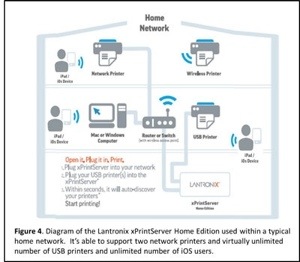
I just did the most awesome thing. I printed a document directly from my iPhone to our company printer. I am told I can also do this from my iPad mini. No special printer is needed nor any special software. All you need is a gizmo called the xPrintServer from Lantronix. There are other brands that offer the same functionality, but I want to tell you about this one because I just used it.
All I had to do was plug the xPrintServer into our network router (or switch with wireless access point) then plug my USB printer (the one we already own) into the xPrintServer. It took seconds for the xPrinterServer to auto-discover my printer. Then, like magic, I was able to print directly from my iPhone. This is all done wirelessly.
The xPrintServer eliminates the need to print through apps, install software, or email myself documents. The xPrintServer works with more than 4,000 top brand USB and network printers.
Okay, your next question is where do I find the print icon on my iPad or iPhone. Very simple. Just press the curved forward arrow on your document the same way you would transfer an email. Instead of email, Facebook, or Twitter options, you will see “Print.” Tap it and watch the wireless magic take place.
Rob Calem, a close industry friend, coincidentally just did a major blog post on wireless smartphone and tablet printing options. Click here to read how a pro explains it all. Or go to http://www.robcalem.com.


 DigiDame