A Smartphone Camera Tip

Steve Greenberg, the Innovation Insider, read my post the other day about how to take the best fireworks photos. Steve quickly called me to say that he has taken some great fireworks photos with his iPhone and wanted to offer a suggestion. I bet this holds true for Android as well.

“When taking a picture with an iPhone, it’s important to understand that the
shutter snaps the image when your finger is REMOVED from the button NOT when
you touch the button– so for the ultimate photo control, set up your
picture with your finger resting ON the shutter button– then when you see
that perfect picture in the view finder, REMOVE your finger from the
button– SNAP– you’ve got the perfect picture.”

Thank you Steve for sharing.

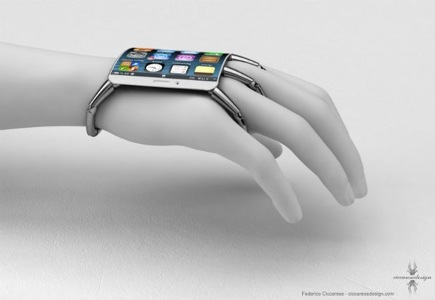
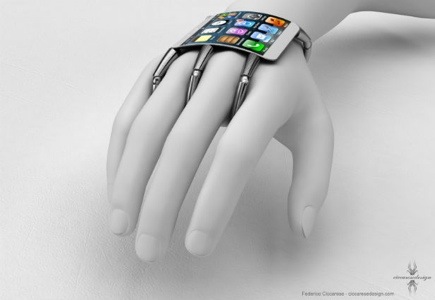
Spider-Like iPhone 5 Design ????

The famous tech blog site, Mashable, gives us a glimpse into “possible” future iPhone (and other smartphones) designs. Instead of a touchscreen slab that’s held in the palm of your hand, imagine the “iPhone 5 with a new curved design that’s actually worn on the back of your hand.

To see more click here

20120708-075814.jpg

20120708-075836.jpg

I Want My Drafts Whenever, Wherever

Let me be the first to tell you the problem with certain applications. Unless you use them a lot you wouldn’t know this.

Your work in “draft form” does not transfer from app to app. For example, I was writing this post on the WordPress app on my iPad.

The iPad’s battery was running low so I switched to WordPress on my iPhone.

I couldn’t finish the post I was working on because it was saved in draft form on my iPad. Drafts only reside where you create them. If I had posted it, I would be able to view it from any of my devices: iPhone, iPad, iPod, and even my laptop.

This is going to be true for any app that allows you to create. A draft is a draft and it stays on the unit you are working on.

If you understand technology you would understand why this all makes sense. I am not a true techie. All I can say is that I want my drafts to transfer this way so I can work in stages from any device.

A girl can only dream.

20120706-113930.jpg

I Am In Bed, Where Are You?

I told Eliot the other day never to tell anyone where I write my DigiDame posts from. Now I am about to spill my guts out. I am still in bed, reading stories from about 20 different newspapers, magazines, websites, blog posts, and broadcast services. I am doing this all on my iPhone.

Yes, I own an iPad but I find it too heavy to hold when I am still flat on my back. I will use the iPad when I am ready to sit up and officially admit I am working. As long as I am lying down, I still feel relaxed and at ease.

Right now I am writing this post on my iPhone. I can’t write this way all the time because some of my posts require more research and funky layouts. Most of the time, I wake up and start reading the many periodicals I rely on everyday. Then I start my writing. I don’t know why some people find it amazing that I can write and read on the iPhone. Many people do it. I even have a friend who reads novels on both Android and iOS smartphones.

Mobile technology has allowed me to play and work hard. Tonight we are expecting around 50-plus people for a 4th of July party in our condo in South Beach, Fl. Desserts, wine and champagne. In the old days, I would have been frantically thinking about how to squeeze all of my responsibilities into the day before the guests arrive?

Today, I take my smartphone with me everywhere. I handle things on the fly.

Read this story from AllThingsD that gives you a deeper report into the lifestyle of the upwardly mobile.

Mobile Technology Frees Workers to Work Any 20 Hours a Day They Choose – Ina Fried – Mobile – AllThingsD

http://allthingsd.com/20120702/mobile-technology-frees-workers-to-work-any-20-hours-a-day-they-choose/?mod=ATD_iphone


20120704-102804.jpg

My Handy Little Gadget

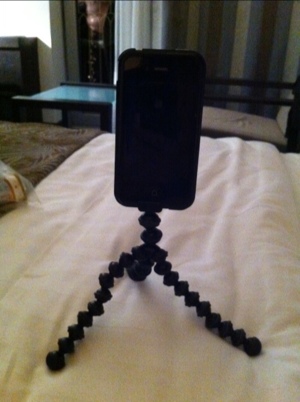
If I want to call attention to myself all I have to do is attach my Joby tripod to my iPhone. Everyone wants to know what that handy little gadget is. The truth is the Joby tripod is a genius contraption that allows me to hold my iPhone above a crowd for the best advantage in shooting stills and video.

I also can even create a video of myself by balancing the iPhone on the Joby tripod. People who own this accessory love it because it provides a tremendous amount of flexibility.

The miniature tripod comes with a special case that wraps around your iPhone. The space age looking tripod attaches to the case. It is all very easy to use. Joby sells tripods for most digital cameras as well.

The following are pictures of the Joby
unit and photos I took in Croatia while using the miniature tripod.

What a clever way to force you to look at some of my photos even before I arrive home.

20120609-003409.jpg

20120609-003422.jpg

20120609-003436.jpg

20120609-003501.jpg

20120609-003518.jpg

20120609-003532.jpg

20120609-003559.jpg

20120609-003624.jpg

20120609-004201.jpg